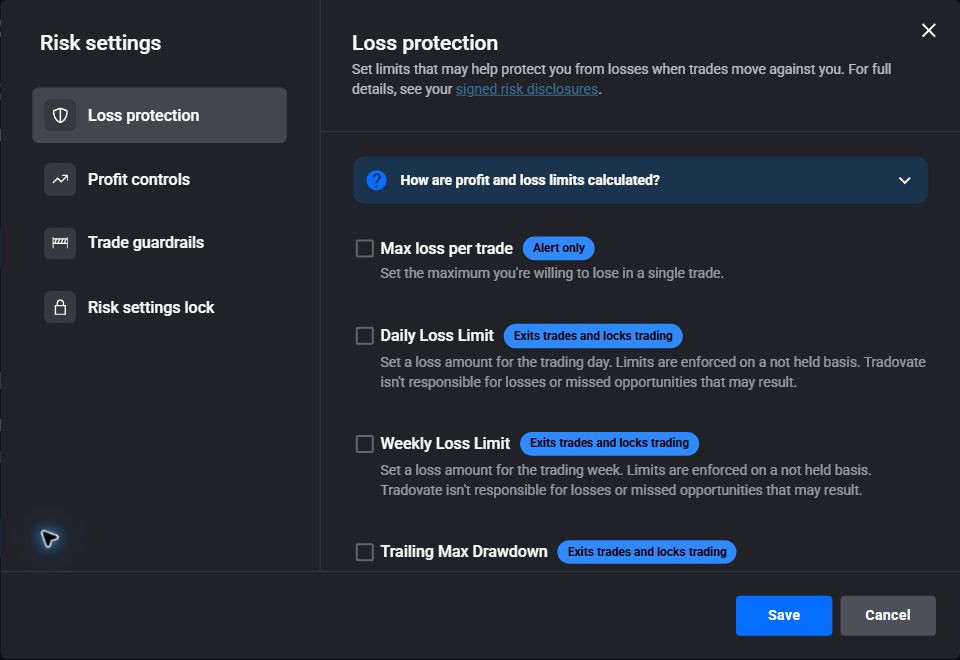
5:00 PM CT Session Start
Tradovate documents the native limit as net P&L calculated from the beginning of its session at 5:00 PM Central Time.

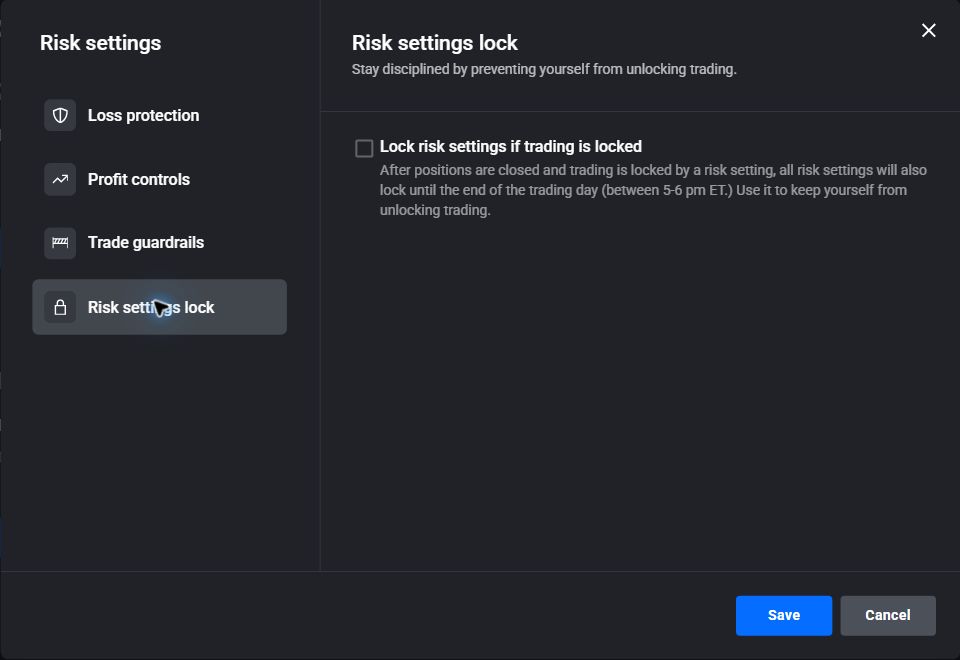
These screenshots were captured from Tradovate's current web interface using a demo account. Labels can change, so use the official Tradovate references below if your screen looks different.
Tradovate documents the native limit as net P&L calculated from the beginning of its session at 5:00 PM Central Time.
The native Tradovate calculation includes realized and open P&L together with fees and commissions.
Tradovate will attempt the liquidation, but it does not guarantee the time or price of execution. In a fast or thin market, the exit may fill after the threshold and the completed loss can be larger than the amount entered.
Tradovate's native control is valuable, but it uses one documented calculation and its optional settings lock applies after a risk limit is hit. TradeReign adds choices and pre-commitment controls designed specifically for traders whose problem is changing the plan after trading starts.
Bottom line: TradeReign is the more flexible and harder-to-bypass discipline layer. Tradovate retains the advantage of being native to the broker. Using TradeReign with an earlier trigger and Tradovate as the final backstop provides stronger defense than relying on either layer alone.
Tradovate defines Daily Loss as net P&L beginning at the 5:00 PM Central session start. Its published calculation includes fees and commissions as well as both realized and open P&L, and Tradovate describes the value as monitored in real time.
That means an open trade can move the account to the threshold before the position is closed. It also means the native number may differ from a realized-P&L-only rule or from a calculation that intentionally excludes certain enforcement exits.
Open Application Settings, choose the Accounts tab, and select Risk Settings for the account you want to protect. Enable the Daily Loss toggle, enter the dollar value, and save the setting.
If the login exposes multiple accounts, confirm that you are editing the intended account. Platform labels can change, so use the official Tradovate support article linked below if your screen differs from these steps.
Tradovate says reaching the entered Daily Loss amount cancels working orders, liquidates the position, and prevents new trades from the account. Without an applicable settings lock, the user can raise or disable the value and resume trading.
Tradovate separately offers Lock risk settings if trading is locked. The checkbox does not freeze the Daily Loss amount when you first save it. Instead, after a risk setting closes positions and locks trading, every risk setting is frozen until Tradovate's end-of-day unlock window, shown in the platform as 5:00-6:00 PM Eastern Time (4:00-5:00 PM Central Time).
This differs from TradeReign Commitment Mode, which can freeze confirmed settings when the trader commits, before a loss limit is reached. Tradovate's native setting is still useful as a post-trigger safeguard against simply raising the limit and resuming trading.
Tradovate says its Daily Loss Limit is enforced on a "not held" basis. In trading terminology, that means the liquidation is attempted without a guarantee that it will execute at a particular moment or price. It does not mean that the loss limit is calculated from net P&L; those are separate concepts.
For example, suppose the limit is $500 and the account reaches a $500 loss while holding a position. Tradovate can submit or work the liquidation, but a fast price move, thin liquidity, or execution delay could produce a fill at a $525 loss. The rule triggered at $500; the final fill simply could not be guaranteed at that exact amount.
Yes. A daily loss limit identifies when an exit should be attempted; it cannot guarantee the final execution price. A fast market can move while an exit is being detected, submitted, acknowledged, and filled. A larger position can also create a larger dollar change per tick.
For that reason, traders who need room below an absolute account or prop-firm boundary should place their personal trigger inside that boundary. The size of that buffer is a personal risk decision, not a guarantee that slippage or a market gap cannot exceed it.
Tradovate's native rule uses its documented net session P&L calculation. TradeReign's Max Daily Loss rule gives the trader additional choices: use closed-trade P&L only or include open P&L, start from the full session or establish a fresh activation baseline, and optionally trigger at a configurable percentage before the entered limit.
TradeReign is reactive rather than an upstream order router. When a configured rule requires action, it sends the relevant cancel or close request through the authorized Tradovate connection and records the result. Brief exposure, slippage, connectivity delays, and broker acknowledgement time remain possible.
A loss number addresses the final boundary, but many damaging behaviors happen before it is reached. Max trades per day, max trades per hour, loss cooldown, no adding to losers, max position size, and stop protection can reduce the behaviors that accelerate a losing session.
Commitment Mode can freeze confirmed TradeReign rule settings for the chosen period. It is intended for traders who know that being able to loosen a rule during an emotional session defeats the reason they set it.
TradeReign is an independent software product and is not affiliated with, endorsed by, or sponsored by Tradovate.
Any reference to Tradovate is used to describe compatible workflows and common trader search intent. Traders should verify Tradovate account settings, platform behavior, and broker or prop firm requirements directly with the appropriate provider.
Platform details on this page were checked against these official resources.
See how daily loss limits fit a broader risk-management workflow with stops, size, trade count, and lockouts.
Learn how rule-based lockouts can help traders stop after configured loss, trade-count, or behavior limits.
Extend a daily stopping boundary into a rule that protects the entire trading week.
Limit repeated entries before overtrading pushes the account toward its daily loss boundary.
Tradovate's daily loss limit is an account risk setting calculated from net session P&L. Tradovate says it includes fees, commissions, realized P&L, and open P&L beginning at 5:00 PM Central Time.
Daily loss limits fail when traders treat them as suggestions instead of hard boundaries. Some traders raise the limit before it is hit, keep trading after early losses, oversize, move stops, or take revenge trades because the emotional urge to recover is stronger than the plan.
In Tradovate, open Application Settings, choose the Accounts tab, select Risk Settings for the account, enable Daily Loss, enter the amount, and save. Confirm the current labels in Tradovate because platform interfaces can change.
Tradovate says it cancels working orders, liquidates the position, and prevents new trades from that account after the configured amount is reached. The user can raise or disable the value unless the applicable risk-lock setting prevents changes.
Tradovate says its daily loss calculation begins with the session at 5:00 PM Central Time. Its separate Lock Risk Settings if Hit feature unlocks during the 4:00–5:00 PM Central Time interval.
Yes. Tradovate's support documentation says the native daily loss calculation includes both realized and open P&L, along with fees and commissions.
Yes. A loss limit is a trigger, not a guaranteed fill price. Fast markets, position size, slippage, detection timing, and broker acknowledgement can cause the completed loss to finish beyond the configured threshold.
It means Tradovate will attempt to liquidate and lock the account when the limit is reached, but it does not guarantee the exact execution time or fill price. In a fast or thin market, the completed loss can therefore exceed the amount entered.
It does not freeze the entered loss limit immediately. After a risk setting closes positions and locks trading, it also locks all risk settings until Tradovate's end-of-day unlock window. Before a risk setting is hit, the setting can still be changed.
TradeReign enforces rules the user configures. It is not a prop firm rule authority, and traders must verify their firm's current rules directly. It can help traders set personal boundaries that support staying inside their own limits.
Pair daily loss boundaries with max trades, cooldowns, stop discipline, and lockouts for supported Tradovate workflows.
Futures trading contains substantial risk and is not suitable for every investor. TradeReign is a trading-discipline and rule-enforcement application. It does not provide trading advice, trade signals, investment recommendations, or performance guarantees.
TradeReign is not a broker-dealer, futures commission merchant, or investment advisor.
Futures trading contains substantial risk and is not for every investor. An investor could potentially lose all or more than the initial investment. Only risk capital - money that can be lost without jeopardizing financial security or lifestyle - should be used for trading. Past performance is not necessarily indicative of future results.