
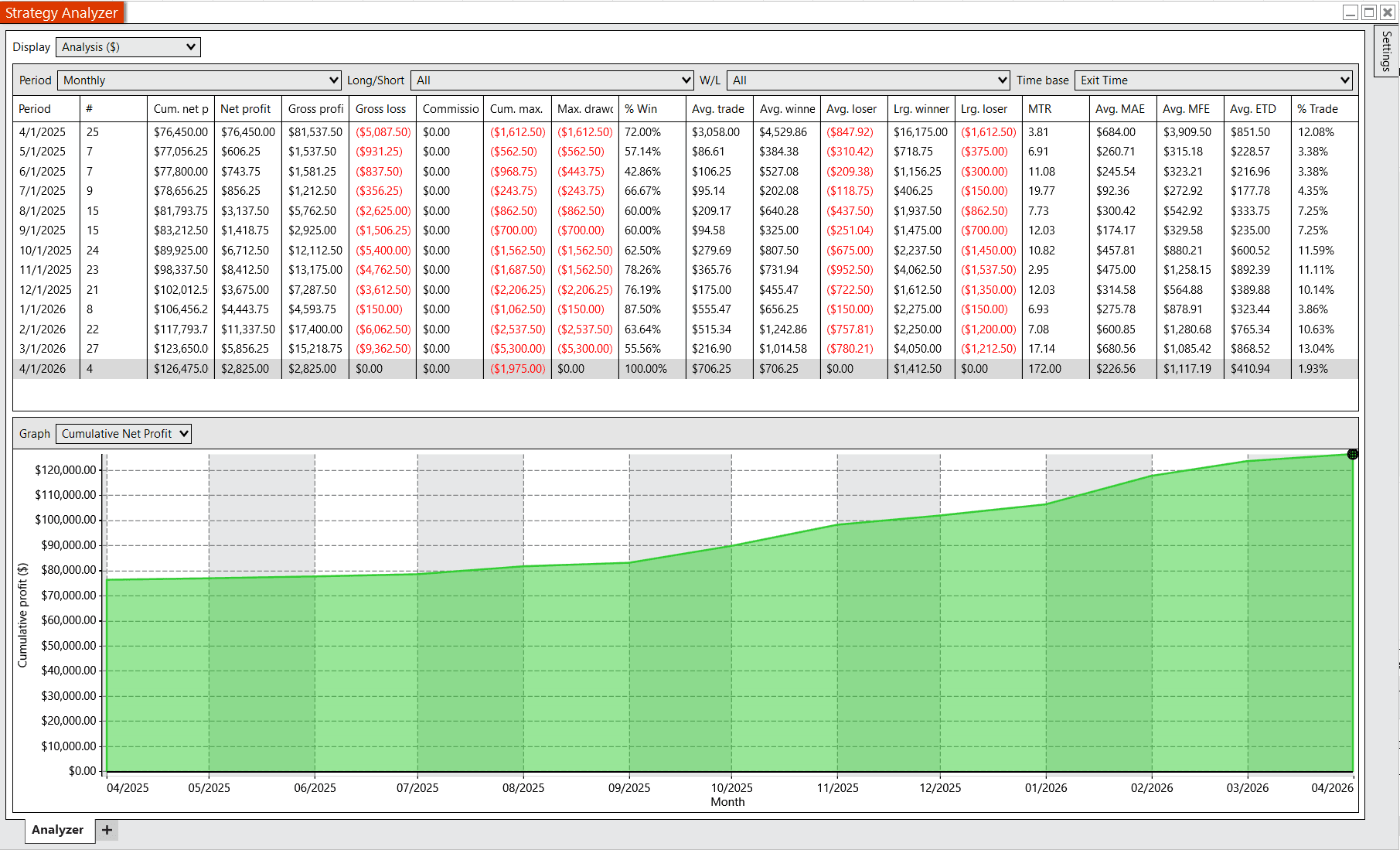
The short version
By default, the strategy builds a 15-minute opening range from the configured session open and a 60-minute Initial Balance range from the same start time. The default Prop Firm preset can take qualified opening-range breakout trades, while certain rejected breakout failures can trigger a rejection-reversal workflow. IB Range fade entries are available only after deliberately switching to and configuring Manual mode.
How the default configuration is designed
The default configuration is built for a typical prop-firm workflow. It applies five MES contracts to the main and base quantities, enables strict daily-profit protection, and disables IB Range entries. The remaining breakout and reversal logic still evaluates volatility, opening-range structure, and other market conditions.
The strategy still contains its broader IB Range system for users who deliberately choose Manual mode. Those optional settings are documented below, but they are not part of the current default Prop Firm backtest.
Trade management is also volatility-aware. Stops, break-even behavior, and targets are designed to scale relative to market movement rather than using only fixed distances, which helps keep behavior more consistent across different environments.
The defaults are intended to provide a balanced starting point built around these principles. They are not presented as a recommendation, but as a plain-English explanation of how the included default profile is structured.
Mode selection
Default execution preset
Prop Firm is the default execution preset. It applies preset quantities, enables strict daily-profit protection, and disables IB Range entries when the strategy configures.
Default trade behavior
The default preset can take qualified opening-range breakout trades and certain rejection reversals. Market context and the strategy's filters still determine whether an entry qualifies.
Prop-firm sizing and cap
The current default uses 5 MES for the main and base quantities, no runner quantity, and an automatically calculated $750 daily-profit cap for the generic 50K profile.
Optional IB Range mode
IB Range fades remain available, but the Prop Firm preset disables them. A user must choose Manual execution mode and deliberately configure IB Range behavior to use those entries.
Key defaults
| Execution preset | Prop Firm |
| Main quantity | 5 MES contracts |
| Base quantity | 5 MES contracts |
| Runner quantity | 0 contracts |
| Daily-profit protection | Enabled with a $750 automatically calculated cap for the default generic 50K profile |
| IB Range entries | Disabled by the Prop Firm preset |
| Opening range | 15 minutes from the configured session open |
| Session open | 8:30 local time by default |
| Initial Balance | 60 minutes from the configured session open |
| Breakout confirmation | 6 closes outside the opening range |
| Breakout retry window | 270 minutes |
| Optional IB fade entry cutoff | 13:00 local time when configured in Manual mode |
| Rejection reversal cutoff | 13:00 local time |
| Auto-liquidate time | 15:40 local/CST setting |
Breakout behavior
The breakout side watches for repeated closes outside the opening range. The default confirmation count is 6 closes outside the OR. Smart Watch mode is enabled, so the strategy does more than immediately fire on the sixth close. It continues building market structure and scoring context around the breakout attempt.
Breakout mode is primarily favored by the dynamic volatility system, and large opening range days can lower the threshold needed to favor breakout mode. Breakout-specific volatility filtering is disabled by default, but the dynamic mode switch still determines whether the breakout branch or the IB Range branch is active.
Smart Watch breakout filtering
With Smart Watch mode enabled, a breakout attempt is not treated as a simple sixth-close market entry. The strategy keeps a running score for the long and short breakout sides, then uses a checkpoint and monitoring phase before an order can be submitted.
The current defaults are designed to keep the smart-mode framework active while still allowing clean breakout attempts to move quickly. That is why Auto-Pass Checkpoint is on by default: the checkpoint can pass when the penalty systems are clean, but the entry can still be blocked later by the entry zone, aligned-boundary logic, or hard indicator gates.
| Smart Watch mode | Enabled by default. It suppresses the older immediate sixth-close breakout entry and routes breakout attempts through a scoring and monitoring workflow. |
| Six-close checkpoint | After 6 closes outside the OR, the smart workflow evaluates the breakout side. The default pre-IB and post-IB checkpoint thresholds are both 60. |
| Auto-pass checkpoint | Enabled by default. If the major penalty systems are clean, the checkpoint can pass even when the raw score is below threshold, but the trade still has to survive monitoring and submission gates. |
| Monitoring entry score | 80 by default. During monitoring, the strategy can enter if the running score reaches this level while price is still outside the OR. |
| Monitoring hold bars | 1 by default. A sustained hold outside the OR can trigger entry after the checkpoint has passed. |
| Score decay | Scores decay by 0.97 per bar by default, so old conviction fades if price stops confirming the breakout. |
| Score cap | 200 by default for each side. |
| Entry distance guard | The default monitoring distance limit is 0.75x the OR range from the OR boundary. If price runs too far, smart mode treats the move as missed. |
Smart scoring inputs
| Positive score inputs | Holding outside the OR, making new outside extremes, strong decisive bars, pivots that hold outside the OR, pivot breaks, and bounces from the OR boundary can add to the breakout side's score. |
| Negative score inputs | Closes back inside the OR reduce score. Repeated inside closes can abort monitoring, especially after a checkpoint has already activated. |
| Formation scan | Enabled by default. The strategy scans the OR formation and can add a one-time directional bonus when the formation score and bias support the breakout side. The default minimum formation score is 50. |
| Indicator score adjustment | ADX, volume, candle size, and momentum scoring are enabled by default. Bollinger Band width scoring is off by default, although the hard BB width filter setting itself is on. |
| Indicator bonuses and penalties | ADX and momentum can add up to 8 points each when good. Volume can add up to 6. Candle size can add up to 5. Poor readings can subtract points from the checkpoint score. |
| IB rejection awareness | Enabled by default after IB completes. Rejections at the relevant IB boundary can subtract 20, 40, 80, or 100 points as rejection count grows from 1 to 4+. |
| OR interpretation penalties | Range pressure, fast traverses, side failure history, and weak side conviction can penalize breakout attempts when the OR behavior looks more like chop or failed expansion. |
| Hard indicator gates | Enabled by default at final smart entry submission. ADX, volume, momentum, candle size, and BB width can still block the order even after the scoring and monitoring flow has found an entry trigger. |
| Aligned boundary gate | Enabled by default. When the OR and IB boundary are closely aligned, the strategy can require additional confirmation, such as holding outside for 11 bars or later breaking the first excursion pivot. |
Optional IB fade behavior
IB fades are not enabled by the default Prop Firm preset. The following behavior applies only when a user chooses Manual execution mode and enables the IB Range system. IB fade mode treats the Initial Balance high and low as important reference boundaries. A long fade is a reaction around IB Low. A short fade is a reaction around IB High. The strategy requires qualification before trying the fade, including reaction confirmation, being inside the trade window, being flat, and meeting the configured approach and entry zone rules.
A reaction is not just a touch of the boundary. By default, price has to show meaningful movement back into the Initial Balance. For partial reactions, the move must be at least 60% of the IB range and at least 75 ticks, with at least 2 bars back inside the IB.
| Long IB fade | Available but disabled by the default Prop Firm preset. In Manual mode it can look for a qualified reaction around IB Low. |
| Short IB fade | Available but disabled by the default Prop Firm preset. In Manual mode it can look for a qualified reaction around IB High. |
| Reaction strength | A partial reaction needs a move back inside the IB equal to 60% of the IB range and at least 75 ticks by default. |
| Inside confirmation | The reaction must spend at least 2 bars back inside the Initial Balance before the partial reaction can qualify. |
| Outside acceptance | The excursion outside the IB boundary must stay within the default 10-bar outside acceptance window. |
| High-volatility guard | IB fades are disabled in high ATR conditions by default. |
| Short fade filter | Short IB fades require a chop day by default. |
| Max fades | Up to 2 IB fade attempts per side per day by default. |
| Entry zone | 6 ticks inside and 6 ticks outside the IB boundary by default. |
| Approach requirement | Initial entries require a prior approach move equal to 40% of the IB range by default. |
| Missed entry handling | If price moves fully outside the entry zone for 2 bars after an attempt is armed, the strategy treats that attempt as missed. Missed attempts expire after 20 bars. |
| Chase behavior | If a fade limit order goes stale, the strategy can escalate while price remains within the configured chase zone. |
Optional IB fade entries
| IB Low fade | A long fade watches for price to breach or test below IB Low, then prove a reaction back inside the Initial Balance. Once qualified, it can place a buy limit around the IB Low zone. |
| IB High fade | A short fade watches for price to breach or test above IB High, then prove a reaction back inside the Initial Balance. Once qualified, it can place a sell-short limit around the IB High zone. |
| Limit placement | If price is close to the zone, the strategy uses a limit price inside the configured zone. If price is more than 8 ticks away but not more than 20 ticks away, it can use a more aggressive chase-style limit. |
| Working order age | IB fade limit orders expire after 5 bars by default if they do not fill. |
| Chase escalation | Chase escalation is enabled by default. A stale limit can be converted into a market-style chase only while price is still in the nearest 25% of the IB range from that boundary. |
Stops, targets, and trade management
| IB long target | Opposite IB boundary by default. A long fade from IB Low targets IB High unless a configured cap applies. |
| IB long stop | Fraction of target distance by default, using 0.5. In plain English, the default long stop starts at half the distance from entry to its target, capped at 90 ticks. |
| IB short target | Fixed 65 ticks by default, capped at 80 ticks. |
| IB short stop | Fixed 60 ticks by default, capped at 80 ticks. |
| IB breakeven | Enabled by default. Long fades move stops at 50%, 70%, and 90% of target progress, locking 1%, 45%, and 65%. Short fades use one default level: 80% progress locks 1%. |
| Fade health gate | Enabled by default. At 60 bars, if the trade has not made at least 1% progress through the IB range, the stop can tighten to 75% of its original distance. At 90 bars, if it has not made 25% progress, the stop can tighten to 30% of its original distance. |
| Breakout target logic | Multiplier and ATR-based target behavior is enabled by default |
| Breakout trailing stop | Enabled by default after breakeven is active |
Reversals
The default profile has rejection reversal enabled, but the older general reversal toggles and standalone rejection entry system are disabled. In plain English: the default profile can react to certain failed breakout conditions by attempting an opposite rejection reversal, but it is not broadly scanning for standalone reversal trades by default.
| Rejection reversal | Enabled by default after certain breakout trades fail from in-trade rejection behavior. |
| Standalone rejection entry | Disabled by default. This is different from rejection reversal. |
| Older BE/stop-out reversal toggles | Disabled by default, including BE reversal, stop-out reversal, and mixed failure reversal. |
| Rejection reversal stop | Uses the furthest rejection pivot by default, with a 10-tick buffer. |
| Rejection reversal target | AutoDetect by default: it can use IB or OR-style boundaries depending on the structure and timing. |
| Reversal quantity | 0 by default, meaning it inherits quantity from the original trade that was reversed. |
Important note
Default settings are a starting configuration only. They do not guarantee results and should not be treated as a recommendation. Users are responsible for testing in simulation, understanding the strategy settings, and deciding whether the configuration is appropriate for their own account and risk tolerance.